.png)
Self-Paced Learning in the K–12 Classroom: A Practical Guide

Most classrooms still run on one speed.
The teacher sets the pace. Everyone moves together. And somewhere in that lockstep, a few fall behind while others sit there waiting, already done.
Kids learn at different rates. Anyone who’s raised one will tell you that. Yet the system keeps pretending otherwise.
Self-paced learning flips that. It gives students the time they need to actually get it, and the space to move on when they’re ready.
The catch? Running a self-paced classroom used to mean a lot of extra work, and time most teachers don’t have.
That’s where AI changes the equation.
Tools like Edcafe AI can generate differentiated quizzes, readings, and chatbots in seconds designed with seamless student access in mind, giving you the interactive materials you need without the time-consuming prep.
This guide walks through what self-paced learning looks like in real K–12 classrooms, why it works, and how to set it up step by step.
What Is Self-Paced Learning? (And Why It Matters Now)
You’ve probably heard the term. But what does it actually mean when the bell rings?
Simply put: self-paced learning allows students to move through material at a speed that fits them.
Self-Paced vs. Traditional Classroom Learning
In a traditional setup, the teacher delivers content to the whole group at once. Same explanation, same practice, same deadline. If you’re lost, you ask or fall behind. If you’re ahead, you wait.
In a self-paced setup, content is available when students need it. They can rewatch, reread, or retry. They can skip what they already know.
The teacher shifts from lecturer to facilitator, spending class time with individuals and small groups instead of the whole class at once.
What the Research Says About Self-Paced Learning

Image by LightFieldStudios
Different studies point to different benefits. Here’s what the evidence shows:
Better memory and retention — Kornell and Bjork (2008) found that learners who control when and how they study show improved long-term retention compared to fixed-pace conditions.
Improved self-regulation — Kizilcec et al. (2017) studied self-paced online learners and found that goal setting and strategic planning predict success; students who revisit materials and monitor their progress perform better.
Stronger engagement — Comparative studies of self-paced vs. facilitated learning suggest self-paced approaches can match or exceed traditional methods when learners have clear structure and support.
Mastery-based progression — A meta-analysis of 108 mastery learning programs (Kulik et al.) found positive effects on achievement across K–12 and higher ed, with particular gains for students who need more time.
The Modern Classrooms Project literature review, for one, synthesizes much of this work for classroom application.
None of it means every classroom should go fully self-paced right away, but it does mean the approach has evidence behind it, and that matters when you’re asking your department or district for permission to try something different.
For Students: Flexibility, Mastery, and Reduced Anxiety
Pause and revisit — Students who struggle aren’t forced to move on before they understand
Move ahead when ready — Those who grasp a concept quickly skip explanations they don’t need
Better retention — When structure is clear, learners who control the pace retain more; they can rewatch or reread without holding the class back
Softer deadlines — Checkpoints instead of hard stops reduce anxiety from “everything is due Friday”
For Teachers: Time to Differentiate and Support Individuals
In a whole-class format, you’re constantly balancing. One student needs a simpler explanation; another needs a challenge. You can’t do both at once.
Self-paced learning changes that. While students work through content on their own, you can:
Pull a small group for targeted support
Sit with one student who’s stuck
Adjust a lesson for someone without holding everyone else up
Respond to what’s actually happening instead of what the schedule says
Differentiation becomes practical instead of theoretical.
The Self-Regulation Advantage
Self-paced learning asks students to manage their own progress.
It doesn’t, and shouldn’t, happen overnight. Some students need scaffolding:
Scaffold | Purpose | Example |
|---|---|---|
Clear checkpoints | Help students know where they are and what’s next | “Complete steps 1–3 before moving to the practice task” |
Progress trackers | Make progress visible (public or individual) | Shared slide deck or individual checklist in a folder |
Regular check-ins | Build accountability without micromanaging | Daily “do now” or weekly status update |
The structure of a self-paced classroom gives them space to develop those habits instead of always following someone else’s schedule.
Try Edcafe AI today for free
Create AI assessments, lesson plans, slides,
flashcards, images, chatbots, and more in
seconds. Sign up for a forever free account today.
How Self-Paced Learning Works in the K–12 Classroom
Self-paced learning shows up in different formats.
Most teachers combine several of these rather than relying on one.
1. Asynchronous Lessons and Video Content
Students access content when they’re ready instead of waiting for a live lesson. Common setups:
Recorded video lessons — You deliver the explanation once; students watch, pause, or rewatch as needed. Edutopia’s guide to instructional videos walks through how to create them.
Reading passages with embedded questions — Students work through text at their own pace, with comprehension checks built in. Edcafe AI’s reading activity generator can level passages and add vocabulary support.
Screencasts or slide decks — Step-by-step walkthroughs students can revisit. No need for everyone to be on the same slide at the same time.
The goal is to move direct instruction out of live class time so you’re free to work with individuals and small groups.
2. Task Menus and Choice Boards
You define the learning goal; students choose how to get there. Each option hits the same standard but offers a different path.
Format | What it looks like | Best for |
Must / Should / Aspire | Core tasks everyone does; extension tasks for those who finish early | Units with clear essentials and optional depth |
Choice board | 6–9 options (read, watch, create, discuss); students pick a set number | Differentiation without creating separate assignments |
Learning stations | Rotate through stations at own pace; some required, some optional | Labs, review days, skill practice |
Classifying lessons (Must Do, Should Do, Aspire to Do) helps students know what’s non-negotiable and what can flex when time runs short.
Digital tools like Edcafe AI let you generate multiple activity options from the same topic (different formats, different difficulty levels) without building each one by hand.
3. Flexible Deadlines and Checkpoints
Instead of “everything due Friday,” use windows and soft touchpoints:
Unit deadlines — “Complete this unit by [date]” with checkpoints along the way
Check-in days — “By Wednesday, submit something—even if it’s halfway” so you can see who’s stuck
Regroup moments — “We’ll come together Friday to discuss what’s next” to maintain momentum without hard grades
These create natural pauses for feedback without the pressure of a single drop-dead date.
Tracking systems, whether a shared spreadsheet, your LMS, or platforms like Edcafe AI, help you see who’s where without manual check-ins.
4. Mastery-Based Progression
Students advance when they show understanding, not when the calendar says so. That means:
Revisions allowed — Students can retry or revise before moving on
Mastery checks — Short assessments to confirm readiness for the next lesson
No partial credit for “done” — The bar is understanding, not completion
This pairs well with self-pacing: students who need more time get it; those who are ready move on.
Auto-graded quizzes with explanations that you can do with tools like Edcafe AI, Google Forms, or Kahoot, give students instant feedback on whether they’re ready to advance.
5. Self-Pacing Within Units (Not the Whole Year)
Self-pacing works best with guardrails.
Letting students self-pace for an entire year can widen gaps: fast learners race ahead while others fall behind and lose motivation.
A more manageable approach: self-pace within each unit.
Set an end-of-unit deadline (aligned to your pacing guide or district expectations), then let students move through the unit at their own speed. When the unit ends, everyone resets. Fresh start, clear boundaries.
This keeps structure while still giving students control.
It also makes it easier to align with school and district calendars.
Setting Up Your Self-Paced Classroom: A Step-by-Step Guide
Step 1: Create Differentiated Materials
When students move at different speeds, you need multiple versions of the same content.
Start with your core material, then create variations for different readiness levels.
For quick differentiation, use Edcafe AI‘s Additional instructions field.
Enter a topic, paste text, or upload a file; then specify what you need:

Easily align any content with guided prompt fields including an ‘Additional instructions’ field to better tailor AI output to exactly what you need
You add | Edcafe AI delivers | Self-paced use |
“Simplify for struggling readers” | Lower Lexile, shorter sentences | Anchor version for students who need support |
“Add higher-order thinking questions” | Challenge prompts, extensions | Stretch for fast finishers |
Grade level + standards | Aligned content at target level | Core material for the unit |
Existing document or YouTube link | Adapted, leveled, or expanded | Repurpose what you already have |
Strong prompt writing makes the output fit the student in front of you without manual editing. You stay in control; Edcafe AI speeds up the build.
Self-paced connection: A student who needs a simpler version mid-unit gets it in seconds. A fast finisher gets extension material without you creating a separate assignment. The same prompt, different instructions.
Step 2: Build Practice Activities with Instant Feedback
Self-paced classrooms need practice that students access when they’re ready, with instant feedback so they know whether to move on or revisit.
Options include:
Auto-graded quizzes — Use Google Forms, Kahoot, Quizizz, or Edcafe AI to create quizzes with explanations. Students get feedback immediately; you see who completed what and where they struggled in the response dashboard.
Flashcards — Generate from your topic or existing content using Quizlet, Anki, or Edcafe AI. Students study at their own pace, shuffle, and retry. Assign via QR code or link so they can practice outside class.
YouTube activities — Link a video and add comprehension questions. Use EdPuzzle, Playposit, or Edcafe AI’s YouTube quiz feature for flipped or asynchronous setups.
Everything you create should live in a central library so you can reuse or clone it next semester.
Step 3: Set Up Support for Independent Work Time
In a self-paced room, students work independently while you’re with others.
They need a way to get unstuck without waiting for you.
Options:
Peer tutors — Designate students who’ve mastered a concept to help others
Video libraries — Record explanations students can rewatch when stuck
AI chatbots — Build a chatbot from your materials that answers questions when you’re not available
In creating AI chatbots, it’s important that it’s designed to be student-facing. You can start with Edcafe AI.
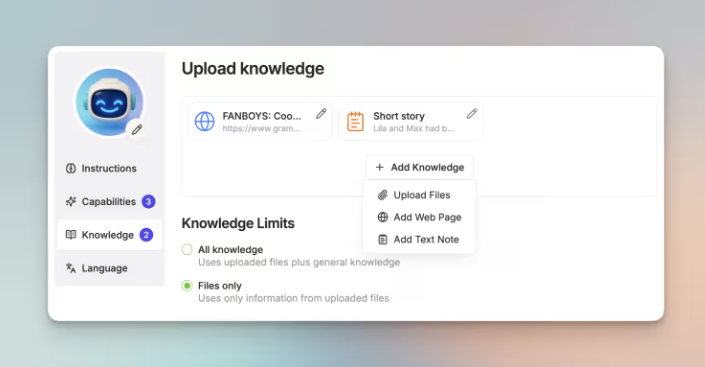
Design your chatbot exactly the way you want it with buildable knowledge base, capabilities, and AI-assisted instructions
You build the chatbot from your materials, notes, or key concepts so it stays aligned to your unit.
Set response rules (e.g., “ask guiding questions; don’t give answers”) so it supports thinking, not shortcuts.
You see conversation summaries and get alerts if a student seems stuck or off-task.
Building a classroom chatbot in Edcafe AI doesn’t require coding.
Define the knowledge, set the tone, assign it.
Self-paced connection: While you're with a small group, other students can ask the chatbot instead of waiting. After school, a student who's stuck on homework gets help without emailing you. The chatbot stays aligned to your unit because you built it from your materials.
Step 4: Assign and Track Progress
Self-paced learning fails when no one notices who’s stuck. You need visibility without manual check-ins.
Set up a tracking system that shows:
Who’s completed what — See who’s behind and who might need a nudge
Where students struggle — Spot concepts the class is having trouble with
Who needs intervention — Identify students who keep asking the same questions
Use your LMS, a shared spreadsheet, or a tool like Edcafe AI that tracks completion and performance in one dashboard.
Edcafe AI’s Assign feature sends materials to students instantly.
QR code, link, or LMS integration: students access quizzes, readings, flashcards, or chatbots on their own devices. No login required on their end.

Foster a self-paced learning culture when you send learning materials straight to students with a simple scan of a QR code
Every assignment comes with a tracking dashboard:
What you track | Why it matters | Where to find it |
Completion by student | See who’s behind and who might need a nudge | LMS reports, tracking dashboard, or Edcafe AI’s Participants view |
Per-question performance | Spot concepts the class is struggling with | Quiz analytics or Edcafe AI’s Questions view |
Chatbot conversation summaries | Identify students who keep asking the same thing | Chatbot logs or Edcafe AI’s insights + red-flag alerts |
Assignment submissions + feedback | Review work and respond efficiently | LMS gradebook or Edcafe AI’s Assignment Grader |

Have access to real-time student submission reports with insights to questions and individual participants
The Assignment Grader adds another layer: upload a rubric, students submit, and you get suggested scores and feedback. Review and adjust before it syncs to the student.
Self-paced connection: The data flows into one place so you respond to what's actually happening. You can pull a small group or sit with one student instead of guessing where to focus
Before You Go
Self-paced learning doesn’t require a full overhaul.
Start with one unit or one block. Add flexibility where it helps, and use tools that reduce the prep load so you can respond to where each student is.
Try Edcafe AI today for free
Create AI assessments, lesson plans, slides,
flashcards, images, chatbots, and more in
seconds. Sign up for a forever free account today.


Comments